Give donors a reason to give today
A match turns “I’ll get to it” into “I’ll do it now.” Set your ratio, cap, and window, put your sponsor’s name on it, and watch matched gifts count toward your goal the moment they land.
Free plan available. Paid plans from $100/mo.
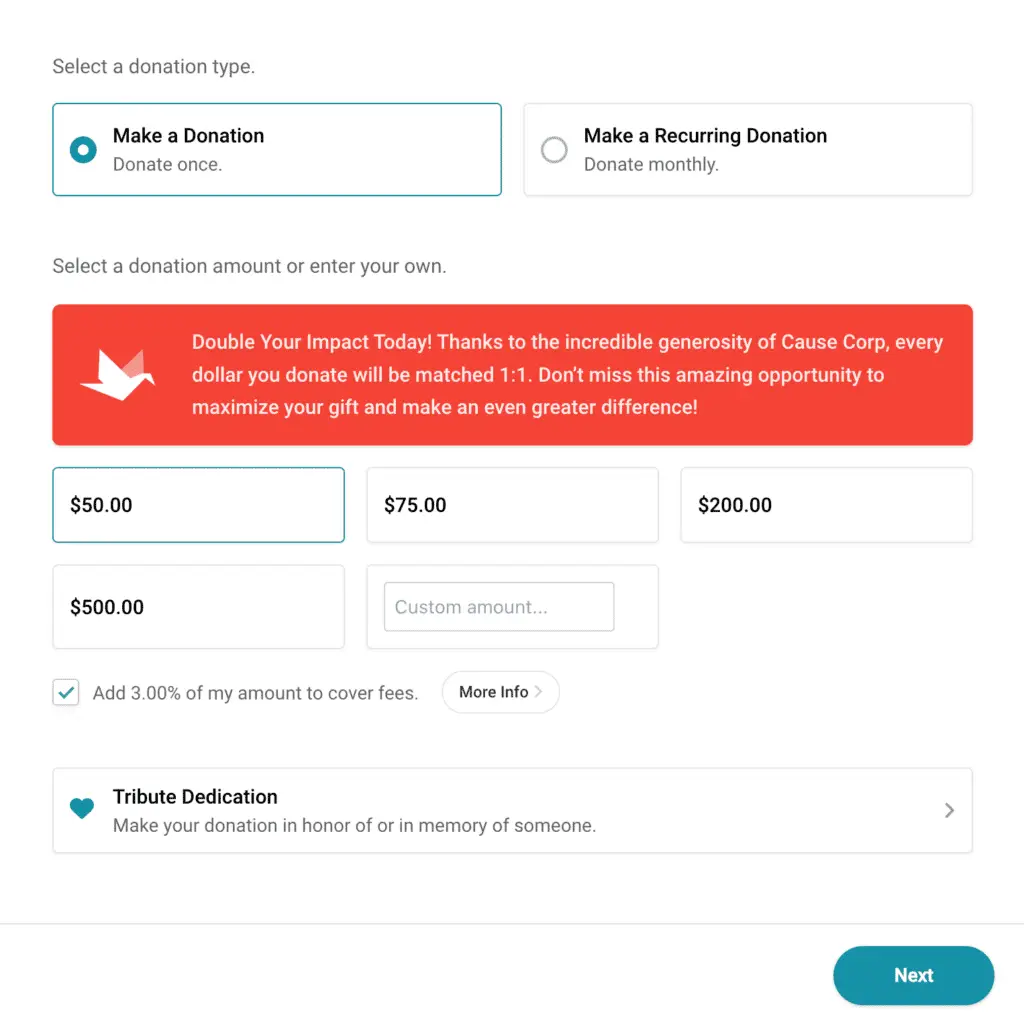
How a matching challenge works in CauseVox
Set up the match
Set the terms of your match before it goes live.
Set a custom ratio — 1:1, 2:1, or whatever your sponsor agreed to — and a per-gift cap so a single large donation doesn’t consume the pool. Give it a total match amount and you’re ready.
Give it a window
Run the match inside a set window so it works as a real deadline.
Schedule a start and end time, so the match is a deadline rather than a background offer. Run several across a campaign — one for a launch, one for a final push — each with its own sponsor and terms.
Put your sponsor’s name on it
Give your match sponsor visible recognition for as long as the match runs.
Display your sponsor’s name and logo on the match itself, so their support is visible to every donor who gives while it’s running.

Show the match working
Show donors their gift being matched as it happens.
Matched amounts count toward your goal as gifts land, and your fundraising thermometer reflects the matched total — so the number moves twice as fast while the match is live. Your donation counter, impact metrics, and the public list of recent gifts all update the same way, each matched gift showing the match beside it. Running the match at an event? Put it on the big screen with a live display.

Use it anywhere you fundraise
Run a match on any campaign where a deadline would help.
Matches run on year-end appeals, giving days, crowdfunding, peer-to-peer events, and galas — wherever a deadline would help.
Follow up on what it produced
See exactly what the match produced, ready to share with your sponsor.
Every matched gift is tracked in your reporting and on the donor’s record, so you can show your sponsor exactly what their match made possible — and make it easy to invite them back next year.
Matching challenge features
Setting up a match
How donors see it
Where matches run
Reporting
Ready to set up your match?
Common questions
Is this employer matching, or a matching challenge?
This is a matching challenge — a sponsor, board member, or major donor puts up a pool, and gifts are matched against it during your campaign. It isn’t an employer-matching lookup that checks whether a donor’s company will match their gift.
What ratios can we set?
Whatever you’ve agreed with your sponsor — 1:1, 2:1, or anything else — with a per-gift cap so a single large donation doesn’t exhaust the pool.
Can we run more than one match in a campaign?
Yes. Run separate matches with their own sponsors, terms, and windows — a launch match and a final-week match, for example.
Do matched gifts count toward our public goal?
Yes. Matched amounts are reflected in your fundraising thermometer as gifts land, so donors can see their gift being doubled in real time.
Can we show our sponsor’s branding?
Yes. Your sponsor’s name and logo display on the match, so every donor who gives during the window sees who made it possible.
Can we tell our sponsor what their match produced?
Yes. Matched gifts are tracked in reporting and on donor records, so you can show them precisely what their match made possible when you invite them back next year.
What does it cost?
There’s a free plan you can start on with no credit card, and paid plans start at $100/month with no commitment. See pricing for the details.
A match works on almost any campaign — see year-end fundraising and giving day software.
Set up your matching challenge
Free to start — no credit card required.
